
In This Article
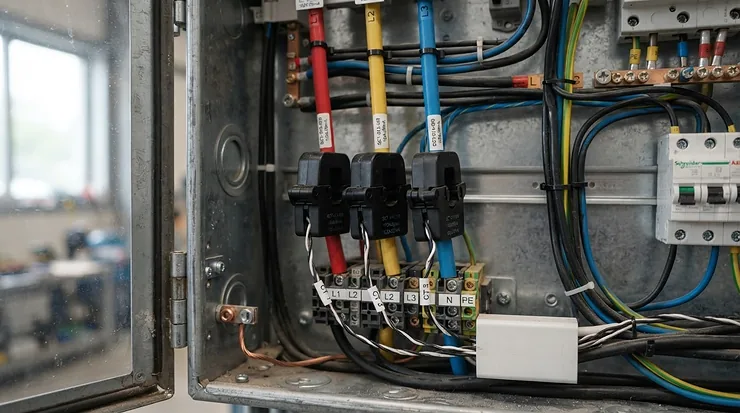
There’s a particular kind of dread that comes with opening an energy bill and having absolutely no idea why it’s so much higher than last month’s. Was it the tumble dryer? The immersion heater somebody left on overnight? A whole home energy monitor clamp exists to end that guesswork, in plain terms: it’s a current transformer (CT) sensor that clips around the cable feeding your consumer unit, or individual circuits within it, and reports back exactly how much electricity is flowing, in real time, without any cutting or splicing of wires. Rather than waiting a month for a bill to tell a vague story, you get the whole plot as it unfolds, appliance by appliance if you want it.
We’ve spent time digging into the real specs, the genuine review sentiment, and the small print of what these devices can and can’t do for a typical UK household, whether that’s a Victorian terrace with a single consumer unit or a newer build with solar panels and an EV charger on the drive. This isn’t a rehash of Amazon listings — it’s an honest look at what a whole home energy monitor clamp actually delivers, where the value genuinely lies, and where marketing promises tend to outrun reality. Along the way we’ll also get into the two secondary questions that trip most buyers up: whether a clamp system still makes sense once you’ve already got a smart meter, and whether you can fit one yourself or need to call an electrician. If you’ve been offered a smart meter through the national rollout programme, you might assume the job’s already done — as we’ll see, that’s only half true.
Quick Comparison Table
Before the deep dive, here’s a snapshot of where each of our featured picks sits — useful if you already know roughly what kind of buyer you are.
| Product | Best For | Price Range |
|---|---|---|
| Emporia Vue 3 | Solar owners wanting full-circuit detail | £90–£160 range |
| Shelly EM Gen3 | Smart-home enthusiasts, no separate hub | Around £60 |
| Owl Intuition-e | Simplicity-first, budget whole-house only | Under £70 |
| IoTaWatt | DIY tinkerers wanting granular circuit data | £130-ish (CTs extra) |
| eMylo 2 Channel WiFi Power Meter | Tightest budgets, basic solar tracking | Under £30 |
Looking at the spread above, the gap between the cheapest and priciest options isn’t really about accuracy — it’s about how many circuits you can see individually and how well the device plays with other smart-home kit. Budget-conscious buyers monitoring a single supply will get similar core data from eMylo 2 Channel WiFi Power Meter as they would from Emporia Vue 3; the latter simply lets you split that picture into sixteen separate stories instead of one.
💬 Found a favourite already? Compare it against the full field below before you commit — the right pick really does depend on your setup.
Top 7 Whole Home Energy Monitor Clamps: Expert Analysis
We’ve deliberately spread this list across budget, mid-range and premium territory, including a couple of lesser-known but genuinely capable options that don’t get the marketing spend of the bigger names.
1. Emporia Vue 3 — best for solar owners wanting circuit-level detail
The standout here is straightforward: Emporia Vue 3 can track up to sixteen individual circuits from a single hub, which is more granularity than almost anything else at this price. The core unit reads your main supply through two or three CT clamps depending on whether your home is single-phase, split-phase or three-phase, while up to sixteen smaller 50A clamps can be added to individual breakers for appliance-level detail. Built-in solar and net-metering support means it separately logs what you generate, what you export, and what you actually consume — a distinction plug-in monitors simply can’t make.
Based on the spec comparison with rivals, the genuine draw of Emporia Vue 3 is that solar tracking isn’t a bolted-on afterthought or paid add-on; it’s baked into the base hardware. That makes it a sensible pick for anyone who’s already invested in panels and wants to understand self-consumption rather than just total draw. Reviewers consistently report that the app is intuitive for spotting which circuit spiked and when, though a few note that live one-second data is only visible while the app is actually open, with longer-term data retained in the cloud rather than stored locally.
Pros:
- ✅ Monitors up to 16 individual circuits from one hub
- ✅ Built-in solar import/export tracking at no extra cost
- ✅ UL and CE certified for safe installation
Cons:
- ❌ Full 16-sensor kit costs more than single-purpose monitors
- ❌ Detailed historical data relies on Emporia’s cloud, not local-only storage
Kits typically fall in the £90–£160 range depending on whether you choose the 8-sensor or 16-sensor bundle — check current pricing before you buy, as availability shifts often. For anyone chasing circuit-by-circuit solar insight rather than a single headline number, this is hard to beat on value.
2. Shelly EM Gen3 — best for smart-home integration without a separate hub
What most buyers overlook about the Shelly EM Gen3 is that it doesn’t need a bridge, gateway or subscription to function — it talks directly to your Wi-Fi and exposes a local API, which matters if you already run Home Assistant or a similar platform. The unit accepts up to two current transformers rated at 50A each (extendable to 80A per channel with the right CT), fits into a standard wall box or DIN rail enclosure, and includes a built-in relay that can physically cut power to a circuit if a threshold is breached.
On paper this means the Shelly EM Gen3 suits anyone who wants energy data to actually do something — trigger an automation, log to a local database, or feed a dashboard — rather than just sit in a branded app. The trade-off is channel count: with only two CT inputs, monitoring more than mains-plus-one-circuit means running several units, which adds up in both cost and consumer-unit space. Reviewers who’ve paired it with home automation setups tend to praise the local control and dry-contact relay; those expecting an out-of-the-box polished consumer app report it feels more like an installer’s tool than a lifestyle gadget.
Pros:
- ✅ Works standalone on Wi-Fi with no separate hub required
- ✅ Built-in relay can automatically cut power to a monitored circuit
- ✅ Plays well with Home Assistant and other automation platforms
Cons:
- ❌ Only two CT channels, so broader circuit coverage needs multiple units
- ❌ The compact DIN-style body still needs careful fitting in a crowded board
At around £60 for the unit with a 50A clamp included, this sits firmly in mid-range territory and rewards anyone comfortable poking around settings menus rather than just an app.
3. Shelly Pro 3EM — best for three-phase homes and EV charger circuits
The short version: Shelly Pro 3EM is one of the few consumer-accessible devices built to properly monitor genuine three-phase supplies, tracking all three phases through 120A clamps with both Wi-Fi and wired LAN connectivity for households that don’t want their energy data at the mercy of a flaky router. A Bluetooth gateway function lets it relay data from other nearby Shelly sensors too, effectively acting as a mini hub for a wider smart-home setup.
Here’s what to weigh: three-phase supplies are relatively rare in UK domestic properties, mostly showing up in larger or rural homes, workshops, or houses that have added heavy loads like an EV charger or heat pump requiring extra capacity. If that’s you, Shelly Pro 3EM earns its premium position because cheaper single-phase monitors simply can’t read the full picture accurately — they’d either miss two-thirds of your supply or need awkward workarounds. For a standard single-phase terrace or semi, this is overkill, and the price difference over the standard Shelly EM Gen3 won’t buy you anything useful.
Pros:
- ✅ True three-phase monitoring in a single unit
- ✅ Both Wi-Fi and wired LAN connection options for reliability
- ✅ Bluetooth gateway extends range to other Shelly sensors
Cons:
- ❌ Significant overkill — and overspend — for a simple single-phase house
- ❌ Value only really shows up on larger, three-phase, or high-load properties
Expect this one to sit in the mid-£100s to low-£200s range depending on retailer and bundle — check current pricing, as three-phase kit tends to fluctuate more than mainstream single-phase gear.
4. Owl Intuition-e — best for straightforward, no-fuss whole-house tracking
There’s a case to be made that not everyone wants circuit-by-circuit granularity — some people just want to know the total number, reliably, without wrestling with an app ecosystem. That’s precisely where Owl Intuition-e earns its keep: a single clamp sensor clips around your main supply cable, a wireless transmitter sends readings to a network gateway, and the whole thing reports total household wattage roughly every six seconds.
An independent three-week test against actual meter readings found the Owl Intuition-e landed within 2–3% cumulative accuracy — solidly within the tolerance expected of any clamp-based inference system, since it’s estimating consumption from current rather than reading it directly off a certified meter. What the spec sheet won’t tell you, but that same testing suggests, is that the display and gateway design feel dated compared with newer app-first rivals; there’s no slick appliance-recognition feature here. For someone who just wants an honest whole-house number without signing up to yet another smart-home app, that simplicity is arguably the whole point rather than a shortcoming.
Pros:
- ✅ Straightforward whole-house wattage reading with minimal setup
- ✅ Independently tested within 2–3% of actual meter readings
- ✅ Doesn’t depend on a wider smart-home app ecosystem to be useful
Cons:
- ❌ No circuit-level breakdown — just the combined household total
- ❌ Display and gateway design feel dated next to app-first competitors
Typically found under £70 for the standard single-channel kit, making it one of the more approachable entry points into whole-home monitoring.
5. Efergy Engage Hub 1.1 — best affordable branded starter kit
Efergy Engage Hub 1.1 has been around long enough to accumulate a genuinely mixed but informative body of real customer feedback, which is worth being upfront about rather than glossing over. A small sensor clips onto the supply cable at your consumer unit, a transmitter relays data wirelessly to the hub, and the hub uploads to Efergy’s online Engage platform and matching phone apps, giving a rolling twelve-month history once it’s bedded in.
Reviewers consistently note that the physical installation is genuinely simple — clip the sensor, connect the hub to a router, follow the on-screen steps — but the mobile app draws more criticism, with recurring reports of it feeling dated or occasionally dropping its Wi-Fi connection and needing a reset. A common complaint in user reviews is around connectivity reliability rather than the core measurement itself, which several long-term owners still rate as accurate enough for day-to-day bill-watching. Based on the spec comparison with newer rivals, this is best framed as a genuinely budget-friendly way into whole-home monitoring, provided you go in with realistic expectations about the software polish rather than the hardware itself.
Pros:
- ✅ One of the more affordable branded hub-and-clamp kits available
- ✅ Straightforward physical setup according to most reviewers
- ✅ Provides a rolling 12-month history once connected
Cons:
- ❌ Reviewers frequently flag the mobile app as clunky or dated
- ❌ Some long-term owners report the Wi-Fi hub occasionally drops connection
Prices generally sit in the £30–£50 range for the hub kit, positioning it as one of the cheaper established-brand entry points into this category.
6. IoTaWatt — best for DIY tinkerers wanting granular, local circuit data
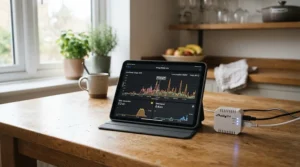
IoTaWatt is the enthusiast’s pick on this list, and it earns that reputation honestly: an open-hardware, open-software 14-channel monitor built around an ESP8266 microcontroller, capable of running its own local web server and storing years of five-second-resolution data without any subscription or cloud dependency. Community reports commonly describe accuracy within around 1% of a household’s actual revenue meter — an unusually tight figure for a clamp-based system, and one that reflects the project’s roots among power-monitoring hobbyists rather than a consumer gadget brand chasing app-store ratings.
What most buyers overlook about IoTaWatt is that the base unit doesn’t include current transformers — you choose and buy CTs separately to match your specific circuits, which adds cost but also means you’re not stuck with clamps sized wrong for your board. This is emphatically not a device for someone who wants to unbox and tap “connect” in an app; it expects a comfort level with configuration screens and, ideally, some patience reading community forum threads about which UK-sized CTs fit a modern consumer unit. For the right audience — people already running Home Assistant or emonCMS, or simply wanting maximum circuit visibility without ongoing fees — it’s genuinely excellent value over time.
Pros:
- ✅ Up to 14 CT channels for genuinely granular circuit monitoring
- ✅ Local web server retains years of data with no subscription required
- ✅ Open hardware integrates cleanly with Home Assistant and emonCMS
Cons:
- ❌ CT clamps are sold separately, adding to the real all-in cost
- ❌ Setup expects comfort with configuration screens rather than simple app taps
The base unit tends to land around £130, with CTs adding anywhere from a few pounds to £20-plus each depending on current rating and split-core design — factor that into your budget before assuming this is the “cheap” option.
7. eMylo 2 Channel WiFi Power Meter — best for the tightest budgets
At the more affordable end sits eMylo 2 Channel WiFi Power Meter, a Tuya/Smart Life-compatible unit shipping with two 80A CT clamps, letting it track a main supply alongside a second feed such as a solar inverter or EV charger point. Bi-directional metering means it can distinguish import from export, which is a genuinely useful feature to find this far down the price ladder, and Smart Life app compatibility brings Alexa and Google Assistant voice-control hooks along for the ride.
Reviewers consistently report that setup through the Smart Life app is quick, in keeping with most Tuya-ecosystem devices, though build quality and long-term support feel noticeably more basic than the bigger brands on this list — a fair trade to expect at this price point. The spec sheet won’t spell this out directly, but with only two channels, eMylo 2 Channel WiFi Power Meter is best understood as a two-feed monitor rather than a genuine whole-home circuit-level solution; it’s the sensible starting point for someone dipping a toe into monitoring rather than committing to full-house granularity from day one.
Pros:
- ✅ One of the cheapest genuinely bi-directional CT clamp kits around
- ✅ Two 80A clamps cover mains plus a solar or EV feed
- ✅ Works through Smart Life with Alexa and Google Assistant support
Cons:
- ❌ Build quality and support feel basic next to established brands
- ❌ Only two channels, so full whole-home circuit detail isn’t possible
Typically found under £30, this is the option to start with if you’re not yet sure whole-home monitoring is for you.
Top 7 Products: Full Comparison
| Product | Circuits Monitored | Connectivity | Price Range | Best For |
|---|---|---|---|---|
| Emporia Vue 3 | Up to 16 | Wi-Fi + cloud app | £90–£160 range | Solar owners, full detail |
| Shelly EM Gen3 | 2 (expandable) | Wi-Fi, local API | Around £60 | Home automation fans |
| Shelly Pro 3EM | 3 (three-phase) | Wi-Fi + LAN | Mid-£100s–low-£200s | Three-phase / EV homes |
| Owl Intuition-e | 1 (whole-house) | RF to gateway | Under £70 | Simplicity-first buyers |
| Efergy Engage Hub 1.1 | 1 (expandable) | RF to hub, Wi-Fi | £30–£50 range | Budget branded starter |
| IoTaWatt | Up to 14 | Wi-Fi, local server | Around £130 (CTs extra) | DIY circuit-level fans |
| eMylo 2 Channel WiFi Power Meter | 2 | Wi-Fi, Smart Life | Under £30 | Tightest budgets |
Read across this table and a pattern emerges: price correlates far more tightly with circuit count and connectivity flexibility than with basic measurement accuracy. Owl Intuition-e and Efergy Engage Hub 1.1 prove that a single-clamp whole-house reading can be had cheaply and reliably, while stepping up to Emporia Vue 3 or IoTaWatt is really a purchase of granularity and automation potential rather than a purchase of “better” numbers. If your goal is simply spotting a rogue appliance driving up your bill, the cheaper end of this table may already answer that question.
✨ Don’t Miss These Exclusive Deals!
🔍 Take your energy tracking to the next level with one of the picks above — click through to check current pricing and availability before stock or offers shift.
Practical Usage Guide: DIY vs Electrician Fit
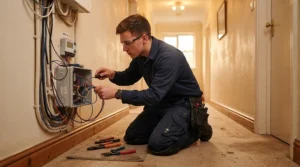
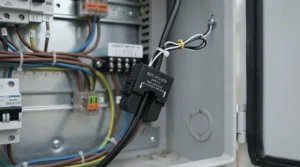
This is where the secondary keyword conversation gets genuinely practical, because it’s the question we hear most: can you fit a whole home energy monitor clamp yourself, or does it need a qualified electrician? The honest answer sits somewhere in the middle, and it depends heavily on where the clamp goes.
Clipping a CT clamp around an accessible cable — for instance, the tails between your meter and consumer unit, in a spot with enough clearance — is generally considered low-risk and non-invasive, since you’re not cutting, splicing or rewiring anything; the clamp simply closes around the existing insulated cable. Many manufacturers, including Owl Intuition-e and Efergy Engage Hub 1.1, explicitly design their kits around this kind of external fit, aimed at competent DIYers rather than qualified tradespeople. That said, “low-risk” is not the same as “risk-free”: you’re working in close proximity to live mains electricity, and if you’re not confident identifying which cable is which, or uncomfortable working near an open meter cabinet or consumer unit, that’s a legitimate reason to call in a professional rather than push through nerves. Several installers quote somewhere in the £50–£100 range for fitting sensor clamps as a standalone job, which is worth weighing against your own confidence level.
Where things shift firmly into electrician territory is anything involving opening up or modifying the consumer unit itself, particularly for multi-circuit monitors like Emporia Vue 3 or IoTaWatt that need individual clamps fitted to several breakers inside a crowded board. In first-30-day terms, the most common mistake isn’t wiring at all — it’s underestimating how tight modern consumer units are, especially in older UK properties where boards were never designed with spare clamp space in mind. A second frequent early mistake is fitting a CT clamp backwards, which several DIY installers have discovered only after seeing consistently negative power readings; most clamps have a small arrow indicating current direction, and it’s worth checking this before closing everything up. Beyond installation, ongoing maintenance is minimal — occasionally re-checking Wi-Fi connectivity and app firmware updates covers most of what these devices need long-term.
Real-World Scenarios: Which Monitor Actually Fits Your Situation
Specs only tell half the story, so here are three genuinely common UK household profiles matched against the field above, based on typical usage patterns rather than any single individual’s experience.
If you’re a homeowner with rooftop solar and a fairly typical three-bedroom semi, someone who wants to understand exactly how much of your own generation you’re actually using versus exporting back to the grid, Emporia Vue 3 is the natural fit — its built-in solar and net-metering support does the import/export split without extra hardware or fees, and the 16-circuit capacity means you can eventually track the immersion heater, the EV charger and the rest separately as budget allows.
If you’re renting or simply want a quick, low-commitment answer to “why is my bill so high this month” without installing anything permanent-feeling, eMylo 2 Channel WiFi Power Meter or Owl Intuition-e make more sense — both give you a genuine, real-time whole-house number for under £70 combined installation and hardware cost in most cases, without asking you to commit to a smart-home ecosystem or years of data storage you may never use.
If you’re a self-builder or renovator with a three-phase supply, perhaps running a workshop, heat pump and EV charger off the same board, Shelly Pro 3EM earns its higher price by actually reading all three phases correctly — a job the single-phase monitors on this list simply cannot do reliably, regardless of how many clamps you bolt onto them.
Problem → Solution: Common Whole-Home Monitoring Headaches
A handful of issues come up again and again once people start living with these devices day-to-day, so here’s how to handle the most frequent ones.
Problem: readings show negative power or wildly inconsistent numbers. This is almost always a reversed CT clamp — most sensors have a directional arrow, and fitting one backwards flips the sign of everything it measures. Solution: unclip, flip, and reclip the sensor so the arrow points toward the load rather than the supply, then allow a few minutes for readings to settle.
Problem: the app or hub keeps losing its Wi-Fi connection. Several reviewers of hub-based systems like Efergy Engage Hub 1.1 report this specific issue. Solution: position the hub as close to the router as practically possible, avoid metal consumer-unit cupboards blocking the signal, and check for firmware updates, since manufacturers do periodically patch connectivity bugs.
Problem: circuit-level data doesn’t add up to the whole-house total. With multi-clamp systems like Emporia Vue 3 or IoTaWatt, small unmonitored circuits (an outside light, a shed supply) will always create a gap between individually tracked circuits and the true total. Solution: don’t chase perfect reconciliation — treat the whole-house clamp reading as the source of truth and circuit-level data as a diagnostic layer on top.
Problem: no space left in the consumer unit for extra clamps. This is one of the most common installation-stage frustrations, particularly in older UK properties with compact boards. Solution: prioritise clamping the mains tails for a whole-house figure first, then add individual circuit clamps only where there’s genuine spare room, or ask an electrician whether a slightly larger replacement board is worth considering during any other planned work.
Problem: uncertainty about whether smart meter data makes a clamp system redundant. We cover this properly in the next section, but the short answer is: not necessarily, and it depends on what level of detail you actually want.
How to Choose a Whole Home Energy Monitor Clamp
Cutting through the marketing, here’s the reasoning that actually matters when narrowing down your options:
- Start with circuit count you genuinely need. A single whole-house reading (like Owl Intuition-e) answers “how much am I using right now,” while multi-clamp systems (Emporia Vue 3, IoTaWatt) answer “which appliance is responsible.” Buy for the question you’re actually asking, not the one that sounds most impressive.
- Check your supply type before anything else. Three-phase homes need a device built for it, such as Shelly Pro 3EM — a standard single-phase monitor simply won’t read the full picture, however many clamps you add.
- Factor in solar and EV charging if relevant. Bi-directional, net-metering-aware devices like Emporia Vue 3 or eMylo 2 Channel WiFi Power Meter separate import from export; a basic unidirectional clamp will just show a confusing average.
- Weigh app polish against local control. If you want an out-of-the-box consumer experience, prioritise brands with consistently praised apps; if you want raw data feeding your own dashboard or automations, local-API devices like Shelly EM Gen3 or IoTaWatt matter more.
- Be honest about your installation comfort level. If clipping a sensor near an open meter cabinet makes you nervous, budget in the electrician’s £50–£100 callout rather than pushing through discomfort.
- Check real consumer-unit space before ordering multi-clamp kits. A 16-sensor kit is only as useful as the physical room you have to fit the clamps.
- Compare ongoing costs, not just upfront price. Cloud-dependent systems are typically free to use but rely on the manufacturer staying in business; local-storage systems like IoTaWatt avoid that risk entirely, at the cost of a steeper setup curve.
CT Clamp Energy Monitor for Smart Meter: Do You Still Need One?
This is the single most common point of confusion we come across, so it’s worth untangling properly. A smart meter already reports your consumption to your energy supplier automatically, and comes with a free in-home display (IHD) showing near-real-time usage — government guidance on this rollout has consistently emphasised that a clear, real-time display is central to whether people actually change their energy habits. So why would anyone add a CT clamp energy monitor for smart meter setups that already have that display?
The honest answer is that a smart meter’s IHD gives you one number: your whole-house total, and often on a slight delay. It generally doesn’t tell you which circuit or appliance is responsible for a spike, and standard SMETS2 smart meters don’t expose that granularity to third-party devices without extra hardware. Some households instead access their smart meter data more directly via services like Hildebrand’s Glow platform, which reads the meter’s own data feed rather than clamping anything physically — but even that route typically only recreates a whole-house figure, sometimes with a delay of around thirty minutes unless you buy dedicated real-time hardware. A CT clamp system, layered on top of or instead of that setup, exists specifically to answer the “which circuit” question a basic IHD can’t, which is exactly the gap products like Emporia Vue 3 and IoTaWatt are built to fill.
Put simply: if you’re happy just knowing your whole-house total and already have a smart meter, you may not need a separate clamp system at all — your free IHD already does that job. If you want appliance or circuit-level detail, want data that updates faster than a smart meter’s reporting interval, or want to feed the numbers into your own home automation setup rather than a supplier’s app, a dedicated CT clamp energy monitor remains genuinely worth adding alongside your smart meter, not instead of it.
Circuit-Level Monitoring vs Whole-House-Only Monitoring
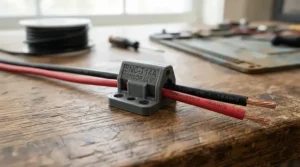
These two approaches solve genuinely different problems, and conflating them is probably the single biggest cause of buyer’s remorse in this category. Whole-house-only monitoring, the approach taken by Owl Intuition-e and, in its base configuration, Efergy Engage Hub 1.1, gives you one continuously updating number: total household draw right now. It’s cheap, simple to fit, and answers “am I using more than usual today” extremely well.
Circuit-level monitoring, as offered by Emporia Vue 3 and IoTaWatt, goes further by clamping individual breakers so you can see, say, that the tumble dryer accounts for 1.2kW of a 3kW total, or that a “vampire” standby load is quietly running overnight on a circuit you’d forgotten about. What most buyers overlook is that this level of detail costs more in three separate ways: more expensive hardware, more clamps to physically fit inside an often-cramped consumer unit, and more time spent labelling and interpreting circuits correctly in the app. Reviewers consistently note that circuit-level systems are genuinely rewarding once set up, but that the setup phase itself takes real effort — this is not a five-minute unboxing job in the way a single whole-house clamp typically is.
The practical takeaway: if your energy-saving question is “how much, overall, and when,” whole-house-only monitoring answers it for a fraction of the cost and hassle. If your question is “which specific appliance or habit is actually driving the bill,” circuit-level monitoring is worth the extra investment, but budget realistic time for the installation, not just the purchase price.
Consumer Unit Installation: What to Expect, Regulations & Costs
Because several of these devices involve working at or near your consumer unit, it’s worth being clear about where UK regulation actually applies, since this is another area rife with confusion. Under Part P of the Building Regulations, certain electrical jobs in English and Welsh homes are classed as “notifiable,” meaning they legally require either a registered electrician or formal notification to local building control. The clearest example is replacing the consumer unit itself, along with installing brand-new circuits — these must go through a registered Competent Person Scheme electrician (NICEIC, NAPIT and similar bodies), who then certifies and notifies the work on your behalf.
Here’s the reassuring part for most whole home energy monitor clamp buyers: simply clipping a non-invasive CT sensor around an existing cable, without touching the consumer unit’s internal wiring, generally falls outside notifiable work, since you’re not installing a new circuit, replacing the board, or altering wiring in a special location such as a bathroom. That said, if a monitor’s installation genuinely requires opening the consumer unit to route multiple sensor cables past several breakers — as is common with 16-clamp kits like Emporia Vue 3 — it’s sensible to treat that as electrician territory even where it isn’t strictly notifiable, purely because working inside a live board carries real risk if you’re not experienced. Expect a qualified electrician to charge somewhere in the £50–£150 range for this kind of sensor-fitting job depending on complexity and location, and always ask for the work to be properly recorded even when it isn’t formally notifiable, since documented electrical work matters if you ever come to sell the property.
Common Mistakes When Buying a Whole Home Energy Monitor Clamp
A few recurring pitfalls show up across reviews and forum threads for almost every product in this category, regardless of brand.
Buying based on channel count alone, without checking supply type first, is probably the most expensive mistake: a beautifully specced single-phase 16-channel monitor is simply the wrong purchase for a three-phase property, and no amount of extra clamps fixes that mismatch. Underestimating consumer-unit space is a close second — several DIY installers of multi-clamp kits report only realising mid-installation that there’s nowhere sensible to route additional sensor cables. A third common error is assuming smart-meter ownership makes any clamp system redundant, when in reality the two solve different granularity problems, as covered above. Finally, buyers frequently overlook ongoing app and cloud dependency, choosing a device purely on hardware specs without checking whether historical data lives locally (as with IoTaWatt) or entirely on a manufacturer’s servers (as with most cloud-app-based rivals) — a meaningful distinction if that company ever changes its pricing or shuts down its service.
Long-Term Cost & Maintenance: Is It Actually Worth It?
Total cost of ownership here is refreshingly simple compared with most smart-home purchases, since there’s no ongoing subscription for the majority of devices covered above — you pay once for hardware and, at most, an optional premium app tier from some manufacturers. The real long-term cost question is less about the device itself and more about what it enables: spotting a faulty appliance quietly drawing power around the clock, for instance, can pay for a budget monitor like eMylo 2 Channel WiFi Power Meter within weeks simply by revealing the problem exists at all.
Maintenance, in the traditional sense, is minimal — CT clamps have no moving parts and nothing to wear out under normal conditions, so the main ongoing task is keeping firmware and companion apps updated, plus periodically checking Wi-Fi connectivity hasn’t quietly dropped. Cloud-dependent systems carry a small long-term risk worth naming honestly: if a manufacturer discontinues its app or backend service, a device like Efergy Engage Hub 1.1 could lose functionality even though the hardware itself still works perfectly. Locally-hosted options like IoTaWatt sidestep that risk entirely, which is part of why enthusiasts favour it despite the steeper initial setup. For most households, though, the return on investment comes less from any single dramatic saving and more from the slow, steady habit change that comes from actually seeing consumption in real time — a pattern the government’s own research into in-home displays has repeatedly highlighted as the real driver of energy savings.
Frequently Asked Questions
❓ Do I need an electrician to fit a whole home energy monitor clamp?
❓ How much does a whole home energy monitor clamp cost in the UK?
❓ Can a CT clamp energy monitor work alongside my smart meter?
❓ Is circuit-level monitoring worth the extra cost over a whole-house-only device?
❓ How accurate are CT clamp energy monitors?
Conclusion
Choosing the right whole home energy monitor clamp really comes down to answering one honest question first: do you want a single reassuring number, or a detailed map of exactly where your electricity goes? For the former, Owl Intuition-e or Efergy Engage Hub 1.1 deliver reliable whole-house tracking without asking much of you technically or financially. For the latter, Emporia Vue 3 and IoTaWatt open up genuine circuit-by-circuit insight, at the cost of a more involved install and, in IoTaWatt’s case, a bit of a learning curve. Three-phase households have a narrower but clear-cut choice in Shelly Pro 3EM, while anyone dipping a toe in for the first time could do a lot worse than starting cheap with eMylo 2 Channel WiFi Power Meter or the mid-ground Shelly EM Gen3 and expanding later if the data proves as useful as it usually does.
Whichever you land on, the underlying value is the same: turning a vague monthly bill into a real-time, specific answer you can actually act on. Fit it yourself if you’re comfortable clipping a sensor near your meter, or budget a modest electrician’s callout if you’d rather leave it to someone qualified — either way, most people find the actual insight arrives faster, and matters more, than they expected.
🔍 Ready to see your own numbers?
Compare the picks above and click through to check current prices before you choose — small differences in circuit count and connectivity make a real difference to which one earns its place on your consumer unit.
Recommended for You
- Hildebrand Glow vs Loop Energy Monitor: 7 Options Ranked 2026
- Best Smart Meter Add-On UK 2026: 7 Real-Time Monitors Ranked
- Multi Socket Smart Extension: 7 Best Picks for UK Homes in 2026
Disclaimer: This article contains affiliate links. As an Amazon Associate, I earn from qualifying purchases. If you purchase products through these links, we may earn a small commission at no additional cost to you.
✨ Found this helpful? Share it with your friends! 💬🤗
