In This Article
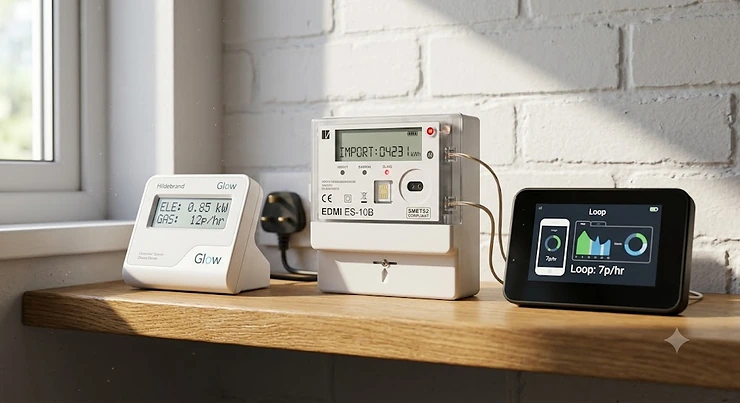
Somewhere on your kitchen worktop, or wedged behind the toaster, there’s probably a little screen nobody looks at anymore. That’s the fate of most supplier-issued in-home displays — a promising idea that quietly gathered dust. The Hildebrand Glow vs Loop energy monitor question is really about resurrecting that promise: turning raw smart meter data into something you’ll actually open, understand, and act on. A home energy monitor is a device or app that reads your smart meter’s electricity and gas data and translates it into pounds, pence, and kilowatt-hours you can actually use to cut your bill.
Both Hildebrand Glow and Loop do exactly that, but they take almost opposite routes to get there. One is a hardware-and-software ecosystem built for people who want raw data, APIs, and control down to the last decimal. The other is a free, phone-first app built for people who just want to open something on the sofa and instantly see where their money’s going. Neither is “better” in the abstract — they’re built for different kinds of curiosity, and that distinction matters more than any spec sheet lets on.
This guide breaks down exactly how these two compare — cost, app interface, historical usage data, and everything in between — then widens the lens to five further real alternatives worth knowing about before you spend a penny. According to Smart Energy GB’s guidance on in-home displays, UK smart meters are required to retain up to 13 months of historical consumption data, which is worth keeping in mind as we compare what each app actually surfaces from that stored history.
Quick Comparison Table: Hildebrand Glow vs Loop at a Glance
| Feature | Hildebrand Glow | Loop | Best For |
|---|---|---|---|
| Upfront cost | Around £70 for the Display/CAD kit | Free app; optional hardware around £70 | Budget-first buyers → Loop |
| Data refresh rate | Roughly every 10 seconds (elec) | Roughly every 30 minutes (some reports note longer lag) | Live-data obsessives → Hildebrand Glow |
| API / developer access | Full API, MQTT, Home Assistant friendly | Closed app ecosystem, no public API | Tinkerers → Hildebrand Glow |
| Historical data depth | Full history via API and Bright app | Reported as effectively unlimited within the app | Trend-watchers → Loop |
| Works without a smart meter | No — requires SMETS1/SMETS2 meter | Optional Loop hardware for non-smart-meter homes | Renters without a meter → Loop |
Reading between the rows, the split is really about who’s doing the thinking. Hildebrand Glow hands you the raw firehose of data and trusts you to build your own dashboards, automations, or spreadsheets from it. Loop does more of that interpretive work itself, turning readings into plain-English nudges like “your standby load looks high this week.” Neither approach is wrong, but if you don’t own a smart plug collection or fancy learning what MQTT stands for, Loop‘s hand-holding will probably suit you better day to day.
💬 Found this comparison useful? A quick share helps other households make a smarter choice too!
Top 7 Energy Monitors for UK Homes: Expert Analysis
Choosing an energy monitor isn’t just a two-horse race between Hildebrand Glow and Loop, even though that’s the search most people start with. Below are seven real, currently available options spanning free apps, budget clip-on displays, and serious whole-home circuit monitors — because the right pick depends heavily on what your meter set-up already allows and how deep you actually want to go.
1. Hildebrand Glow — most open data ecosystem for tinkerers
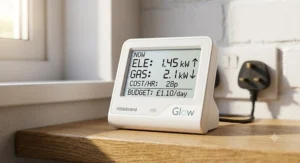
What makes the Hildebrand Glow stand out isn’t the display itself — it’s everything happening behind it. The combined In-Home Display and Consumer Access Device (CAD) pairs with your SMETS1 or SMETS2 smart meter and pushes readings to the Bright app roughly every ten seconds for electricity and around every thirty minutes for gas, which is a genuinely fast refresh rate compared with most rivals on this list. Crucially, Hildebrand also exposes that same data through a public API and local MQTT, meaning anyone comfortable with Home Assistant can build their own dashboards, automations, or cost alerts on top of it — no other product here offers that level of openness. This makes Hildebrand Glow the clear pick for people who see their energy data as a project, not just a number to glance at: think Octopus Agile customers wanting historical tariff overlays, or smart-home enthusiasts automating appliances around cheap-rate windows. Reviewers on Hildebrand’s own site consistently praise the depth of the Bright app once set up, though several also note the meter-verification step before ordering can feel bureaucratic for a first-timer. Setup requires going through Hildebrand’s SECAS-approved verification process before your device ships, which adds a short delay compared with simply downloading an app.
Pros:
- ✅ Full API and MQTT access for custom dashboards
- ✅ Near real-time electricity readings roughly every 10 seconds
- ✅ Unique Octopus Agile tariff and cost history support
Cons:
- ❌ Requires meter verification before the device is even shipped
- ❌ Hardware kit costs more than several free-app rivals
The Hildebrand Glow Display and CAD kit sits around £70 at the time of research, with prices and stock levels always worth double-checking before you order — for the data depth and openness on offer, that’s a fair one-off outlay rather than an ongoing drain.
2. Loop — best free app for everyday households
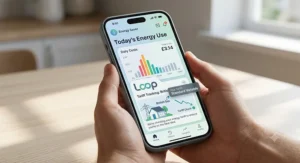
If Hildebrand Glow is for people who want to build something, Loop is for people who just want an honest answer to “where is my money going?” without installing anything extra. The free Loop app connects to your existing SMETS2 smart meter account and pulls consumption data by half-hour, day, month, or year, presented in both kWh and pounds-and-pence — and unlike some supplier apps, it factors in your standing charge automatically rather than showing usage in isolation. Trustpilot reviewers repeatedly single out the app as easier to navigate than their own supplier’s tool, with several noting they switched to Loop specifically because their energy company’s in-house app was unreliable or slow to update. That reliability angle matters: for a family trying to spot which evening habit is spiking the bill, a clean, fast-loading dashboard beats a technically superior one that nobody opens. On the flip side, some App Store reviewers note usage data can lag by a few hours rather than being genuinely live, so anyone wanting instant feedback while a kettle is boiling may find it slightly behind the moment. Loop also offers a phantom-load calculator that estimates how much standby power idle appliances are quietly costing you.
Pros:
- ✅ Completely free with no subscription tier required
- ✅ Standing charge included automatically in cost figures
- ✅ Clean, frequently praised app navigation and layout
Cons:
- ❌ Usage data can lag by a few hours, not instant
- ❌ No public API for custom home automation projects
Loop costs nothing to download and use with an existing smart meter, making it the obvious starting point before spending anything on hardware — the optional Loop Home Mini hardware for non-smart-meter homes sits in a similar price bracket to the Hildebrand Glow kit.
3. Geo Minim+ — cheapest standalone clip-on monitor
Before smart meters were universal, Geo Minim+ was the budget staple for anyone wanting a rough idea of their electricity draw without any app or Wi-Fi involved. It works via a simple current clamp fitted around your meter’s live cable, transmitting wattage, running cost, and CO2 estimates to a small battery-powered display — no broadband, no smart meter, no account sign-up required. That simplicity is exactly the point: for someone in a rented flat with an old-style meter who just wants to see the number jump when the immersion heater kicks in, Geo Minim+ does the job at a fraction of the cost of app-based rivals. The trade-off, confirmed in independent hands-on testing, is that on-device historical tracking tops out at roughly two months before older data rolls off, which makes it a poor fit for anyone wanting year-on-year comparisons. Real customer reviews are consistently positive on ease of set-up, though a handful mention the clip can be fiddly to fit behind a tightly mounted meter.
Pros:
- ✅ No Wi-Fi, smart meter, or account needed at all
- ✅ Genuinely simple clip-on install in under 20 minutes
- ✅ Lowest upfront cost of any monitor on this list
Cons:
- ❌ On-device historical data limited to roughly two months
- ❌ No smartphone app — display only, no remote access
At around £38-£40, Geo Minim+ remains the cheapest credible entry point on this list — brilliant for a first taste of monitoring, less so if you want to track a full year of seasonal heating patterns.
4. Emporia Vue — best for circuit-level whole-home detail
Every monitor so far measures your home as one lump total, but Emporia Vue breaks that total down circuit by circuit inside your consumer unit, using clip-on current transformers on individual breakers. That’s a genuinely different tier of insight: instead of guessing which appliance caused a spike, you can see your oven, immersion heater, and EV charger as separate live lines on the same graph. For anyone running solar panels or a home battery, Emporia Vue also supports generation monitoring, letting you track self-consumption versus export in a way none of the app-only options here can match. The 1-second refresh rate on circuit data is genuinely fast, and the companion smart plugs extend that same granularity down to individual appliances if you want it. The catch is complexity and cost: fitting current transformers inside a consumer unit isn’t a job for everyone, and UK buyers report needing an electrician for anything beyond the most confident DIYer, which adds to the real cost of ownership.
Pros:
- ✅ True circuit-level breakdown, not just a whole-home total
- ✅ Solar generation and export monitoring built in
- ✅ Fast 1-second refresh rate on live circuit data
Cons:
- ❌ Installation inside the consumer unit often needs an electrician
- ❌ Highest upfront cost of the seven products here
In the £120-£135 range before any installation cost, Emporia Vue is a serious investment rather than a casual buy — but for solar households or anyone chasing appliance-level detail, it’s arguably the most capable device on this list.
5. OWL Intuition-E — cloud dashboard with a subscription catch
OWL Intuition-E takes a different shape again: a wireless clip-on sensor and gateway that plugs into your router, pushing live and historical electricity data up to OWL’s own Intelligent Cloud platform, viewable via browser or app from anywhere. Independent reviewers rate it well for whole-house monitoring on a single-phase supply, praising the clarity of the web dashboard’s graphs and the ability to download data for your own analysis. Where it gets more complicated is cost structure: several independent comparison sites note that after an initial two-year period, continued access to OWL’s cloud platform requires a paid subscription — a detail that’s easy to miss at checkout and worth weighing carefully against free alternatives like Loop. It also doesn’t support solar monitoring, which rules it out for a growing slice of UK households now generating their own power. Still, for someone without solar who wants a proper web dashboard rather than a phone-only app, it fills a real gap between the DIY simplicity of Geo Minim+ and the circuit-level depth of Emporia Vue.
Pros:
- ✅ Full web browser dashboard, not just a phone app
- ✅ Genuinely detailed historical graphs and downloadable data
- ✅ Works on any single-phase electricity supply
Cons:
- ❌ Subscription required to keep cloud access after two years
- ❌ No solar panel or generation monitoring support
Priced around £90 up front, OWL Intuition-E looks competitive against Hildebrand Glow on paper — but factor in that eventual subscription and the long-term maths shifts meaningfully in Hildebrand Glow‘s favour.
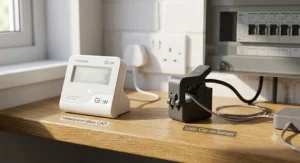
6. Chameleon IHD3 — the free display most people already own
It’s easy to forget that many UK households already own a perfectly functional energy monitor: the Chameleon IHD3, the in-home display bundled free with most SMETS2 smart meter installations by major suppliers. It shows near real-time electricity and gas cost in pounds and pence directly on a small kitchen screen, with no app, subscription, or extra hardware purchase involved. As Citizens Advice explains in its smart meter guidance, all in-home displays are required to show a consistent minimum set of information regardless of manufacturer, including current cost and historical use. For someone who genuinely just wants a glance-and-go number on the worktop, the Chameleon IHD3 already does that job at zero extra cost — the honest analysis here is that most people shouldn’t buy anything until they’ve confirmed their existing free display genuinely doesn’t meet their needs. Where it falls short is exactly where Hildebrand Glow and Loop step in: no phone app, no historical trend graphs beyond the on-screen basics, and no way to export or automate anything from the data it holds.
Pros:
- ✅ Already included free with most SMETS2 installations
- ✅ No app, account, or subscription required whatsoever
- ✅ Simple enough for any household member to read instantly
Cons:
- ❌ No smartphone app or remote access away from home
- ❌ Limited historical trend view compared with app-based rivals
Cost: effectively free if supplied with your smart meter installation — which makes it the obvious baseline every other product on this list has to beat.
7. TP-Link Tapo P110 — best for tracking one appliance at a time
Not every monitoring need is whole-house. Sometimes the question is narrower — “is the tumble dryer actually this expensive to run?” — and that’s exactly where a smart plug like the TP-Link Tapo P110 earns its place on this list. It sits between the wall socket and the appliance, tracking that single device’s live wattage and cumulative cost through the Tapo app, with scheduling and remote on/off control thrown in as a bonus most dedicated monitors don’t offer. For renters who can’t fit clip-on sensors near a meter cupboard, or anyone wanting hard evidence before replacing an ageing appliance, this pinpoint approach genuinely beats a whole-home total that can’t isolate individual culprits. Aggregated user reviews across UK retailers consistently praise reliability and easy app pairing, though a few flag that the historical data view inside the Tapo app is noticeably more basic than dedicated energy-monitoring platforms like Loop or Hildebrand Glow‘s Bright app. Buying several to cover your worst offenders quickly adds up in cost, so it works best as a targeted diagnostic tool rather than a full home strategy.
Pros:
- ✅ Pinpoints exactly one appliance’s real running cost
- ✅ Cheapest single unit of any product on this list
- ✅ Doubles as a remote-controllable smart plug too
Cons:
- ❌ Only monitors whatever it’s directly plugged into
- ❌ Basic historical data view compared with dedicated apps
At under £15 per plug, the TP-Link Tapo P110 is an easy, low-risk add-on to either the Hildebrand Glow or Loop set-up rather than a genuine substitute for either.
Top 7 Products Compared: Specs and Price Ranges
| Product | Price Range | App or Display | Historical Data | Best For |
|---|---|---|---|---|
| Hildebrand Glow | Around £70 | Bright app + kitchen display | Full history via API | Home automation tinkerers |
| Loop | Free (app) | Phone app only | Effectively unlimited in-app | Everyday budget-conscious households |
| Geo Minim+ | £35-£40 range | Standalone display only | Roughly 2 months on-device | First-time budget buyers |
| Emporia Vue | £120-£135 range | Phone app | Full history, circuit-level | Solar homes wanting circuit detail |
| OWL Intuition-E | Around £90 | Web dashboard + app | Detailed, subscription-gated later | Non-solar households wanting a web view |
| Chameleon IHD3 | Free with install | Kitchen display only | Basic on-screen history | Anyone happy with a simple glance |
| TP-Link Tapo P110 | Under £15 | Phone app | Basic, per-appliance only | Diagnosing one costly appliance |
Laid out side by side, the pattern is fairly clear: price roughly tracks how granular the data gets, with Emporia Vue at the expensive, circuit-level end and the Chameleon IHD3 at the free, glance-only end. Hildebrand Glow and Loop sit in an interesting middle ground where cost stops being the differentiator and openness versus simplicity becomes the real deciding factor. If you’re weighing this table against your own habits, ask honestly whether you’d ever open a web API — if the answer’s no, that £70 is better spent on Loop‘s free app plus a couple of Tapo plugs for your worst offenders.
Practical Usage Guide: Getting the Most From Your Energy Monitor
Buying the right device is only half the job — most households leave real savings on the table simply by never adjusting the defaults. Start by setting your actual tariff rates inside whichever app or display you choose, since both Hildebrand Glow and Loop default to estimated national averages until you input your real unit rate and standing charge, and that single step can shift every cost figure you see by several pence per kWh. In the first week, resist the urge to obsess over live numbers and instead let a full seven-day cycle complete, so you capture both a weekday and weekend pattern before drawing conclusions. A common first-30-days mistake is comparing single days against each other rather than looking at rolling weekly totals, which makes normal variation — a big laundry day, a colder evening — look like a worrying trend when it isn’t. Once you’ve got a baseline, set a weekly reminder to actually open the app rather than relying on notifications alone; Loop’s own data suggests the households seeing genuine savings are the ones checking in regularly, not just installing and forgetting. For Hildebrand Glow owners specifically, it’s worth spending twenty minutes exploring the API documentation even if you never plan to code anything yourself — plenty of ready-made Home Assistant integrations exist that require no programming knowledge at all, just a bit of copy-pasting.
Real-World Scenarios: Which Monitor Actually Suits You
Picture three different households, because the “best” energy monitor genuinely depends on who’s asking. First, a young couple in a rented flat with a SMETS2 meter already installed and zero interest in spreadsheets — for them, Loop is close to a no-brainer: free, fast to set up, and honest about where the standing charge sits inside their bill without them lifting a finger. Second, a family of four in a semi with solar panels on the roof and an EV on the driveway, trying to work out whether their car charging overnight is actually cheaper than daytime solar self-consumption — that’s squarely Emporia Vue territory, where circuit-level detail turns a vague hunch into an actual answer. Third, a retired couple who’ve just discovered smart-home automation and want their heating to respond automatically to cheap overnight rates on an Octopus Agile tariff — here, Hildebrand Glow‘s open API and Agile-specific history support genuinely earn their keep, letting a family member (or a hired installer) build automations that neither Loop nor the Chameleon IHD3 could support. None of these three would be well served by simply picking whichever product ranks first on a “best energy monitor” listicle — the right choice follows the household, not the other way round.
How to Choose Between Hildebrand Glow and Loop
Working through this decision doesn’t need to be complicated if you ask the right questions in order:
- Check your meter type first. Both products need a working SMETS1 or SMETS2 smart meter with a live communications hub — if yours is offline, sort that with your supplier before comparing apps.
- Decide if cost or capability matters more. Loop costs nothing and covers most everyday needs; Hildebrand Glow‘s roughly £70 outlay only pays off if you’ll actually use the extra depth on offer.
- Consider your appetite for tinkering. If Home Assistant, MQTT, or building your own dashboard sounds appealing rather than intimidating, Hildebrand Glow‘s API access is a genuine differentiator.
- Check your tariff type. Octopus Agile customers gain a specific advantage from Hildebrand Glow‘s historical tariff-and-cost tracking that Loop doesn’t replicate in the same way.
- Think about refresh speed needs. If you want to watch wattage jump the instant the kettle goes on, Hildebrand Glow‘s roughly 10-second refresh beats Loop‘s slower update cycle.
- Factor in household buy-in. An app the whole family will actually open, like Loop‘s straightforward interface, often beats a more powerful tool that only one tech-keen person ever touches.
- Revisit in a year. Both products evolve — check current app store ratings and Hildebrand’s own release notes before assuming today’s comparison holds forever.
App Interface Comparison: Bright vs Loop
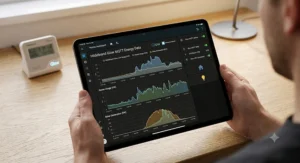
Since app interface comparison is often the deciding factor once cost is out of the way, it’s worth being specific about what each screen actually shows you day to day. Hildebrand’s Bright app leans into density: multiple tabs cover live usage, historical graphs by day/week/month/year, and — for Octopus Agile customers — a dedicated tariff-and-cost overlay that no other app on this list replicates. That richness is genuinely useful once you know where to look, but several Hildebrand reviewers note there’s a real learning curve in the first session, with settings and API tokens sitting a few taps deeper than a casual user might expect. Loop‘s interface takes the opposite bet: a clean home screen surfaces today’s spend in large, unmissable text, with usage broken into half-hourly, daily, monthly, and yearly views reachable in a single tap, and Trustpilot reviewers repeatedly describe it as easier to navigate than their own supplier’s official app. The honest trade-off is depth versus approachability — Bright rewards patience with more granular control, while Loop‘s simplicity means less to learn but also less to configure once you outgrow the basics. Households with a mix of tech comfort levels — say, one partner who loves data and one who just wants the headline number — often find Loop‘s single clear screen easier to actually share round the kitchen table.
Historical Usage Data: How Far Back Can You See?
Historical usage data is where the real long-term value of any energy monitor lives, because a single day’s reading tells you almost nothing about whether your bill is trending up or down. Hildebrand Glow‘s Bright app pulls historical data directly through its API, meaning your archive is effectively as deep as your smart meter’s own stored records allow, and power users can export that history for their own year-on-year spreadsheets or Home Assistant dashboards. Loop takes a similarly generous approach within its own app, with independent comparison research describing its historical tracking as effectively unlimited, letting you scroll back through months or years of half-hourly, daily, and monthly totals without hitting an artificial wall. That’s a sharp contrast with a budget device like Geo Minim+, whose on-device storage caps out at roughly two months before older readings simply roll off and disappear — fine for spotting this week’s habits, useless for comparing this January’s heating costs against last January’s. If year-on-year comparison genuinely matters to you — tracking the effect of loft insulation, a heat pump install, or simply rising unit rates — that rules out several of the cheaper standalone displays on this list and points firmly toward Hildebrand Glow, Loop, or Emporia Vue instead.
Subscription vs One-Off Cost: What You’re Really Paying For
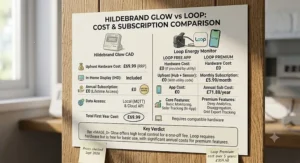
Subscription vs one-off cost is the constraint’s other frequently overlooked catch, and it’s worth reading the fine print before assuming a single upfront price is the whole story. Hildebrand Glow‘s roughly £70 Display and CAD kit is genuinely a one-off cost — once verified and connected, there’s no recurring fee to keep the Bright app or API access working. Loop goes further in the other direction, remaining entirely free with no subscription tier at all for its core app functionality, funded instead by optional partner referrals for services like solar installation quotes that you’re never obliged to use. OWL Intuition-E is where the model shifts: several independent comparison sites flag that continued access to its cloud dashboard requires a paid subscription after an initial two-year window, which meaningfully changes its total cost of ownership versus the headline £90 purchase price. Run the maths over five years and the ranking flips: Loop stays free throughout, Hildebrand Glow‘s one-off cost is fully absorbed within the first year or two of avoided subscription fees, while OWL Intuition-E could end up the most expensive product on this entire list once renewal fees are counted in.
✨ Don’t leave money on the table — compare current prices on any product above before your next energy bill lands!
Common Mistakes When Buying an Energy Monitor
The single most common mistake is buying hardware before checking whether a free option already covers the need — plenty of households spend £70 on a monitor when their existing Chameleon IHD3 or a free Loop account would have answered the question just as well. A close second is ignoring compatibility: Hildebrand Glow, Loop, and most app-based monitors need a working, communicating SMETS1 or SMETS2 meter, and a meter stuck in “dumb mode” after a supplier switch will sink any of these products regardless of reviews. Buyers also frequently underestimate installation reality for circuit-level devices like Emporia Vue, assuming a weekend DIY job when UK wiring regulations and consumer unit access often call for a qualified electrician instead. Another recurring pitfall is choosing based on price alone without checking the ongoing cost structure — as covered above, OWL Intuition-E‘s post-two-year subscription can quietly overtake a pricier one-off purchase like Hildebrand Glow. Finally, many buyers set a device up once, glance at it for a week, then never open the app again — the BEAMA-commissioned research into UK energy monitors found real electricity savings sustained over multiple years, but only among households that kept actively engaging with the data rather than treating installation as the finish line.
Energy Monitors vs Supplier In-Home Displays
It’s worth asking directly why anyone should buy Hildebrand Glow or Loop at all when every SMETS2 installation already comes with a free in-home display like the Chameleon IHD3. The honest answer is that supplier IHDs are built to a regulatory minimum, not to be genuinely useful long-term — they satisfy the requirement to show cost and basic historical data, but almost none offer a proper smartphone app, remote access away from home, or any way to export your own data. Loop effectively rebuilds that same core function as a proper phone app with a more thoughtful interface and unlimited-feeling history, at no extra cost, which is why it’s such an easy first upgrade. Hildebrand Glow goes further still, adding API access and automation hooks that put it in an entirely different category from any supplier-issued display, free or otherwise. That said, the free IHD isn’t worthless — for a household that genuinely just wants a kitchen-counter number and nothing more, upgrading to either alternative may add complexity without adding value they’ll actually use. The right test is simple: if you’ve opened your supplier’s IHD or app more than twice in the last month and found it lacking, that’s your signal to look at Hildebrand Glow or Loop instead.
Long-Term Cost & Maintenance
Thinking beyond the first month, long-term cost and maintenance differ more between these products than their purchase prices suggest. Hildebrand Glow and Loop both require essentially zero ongoing maintenance once connected — no batteries to replace, no clips to re-fit, since both draw data through your existing smart meter’s communications hub rather than any physical sensor of their own. Battery-powered clip-on devices like Geo Minim+ are the outlier here, needing occasional transmitter battery changes and periodic re-clipping if the sensor shifts, which is a small but real recurring task worth budgeting for. From a pure return-on-investment view, Loop‘s zero cost means any behavioural savings are pure upside from day one, while Hildebrand Glow‘s roughly £70 outlay typically pays for itself within the first year for households that genuinely act on the data — a modest 5-9% reduction in typical UK electricity spend, in line with the BEAMA research on in-home displays cited earlier, comfortably clears that bar for most homes. OWL Intuition-E and other subscription-gated platforms need the most careful long-term maths, since a device that looks competitively priced today can become the most expensive option on this list once renewal fees stack up over several years of ownership.
Safety, Data Privacy & Regulations Guide
Every product on this list connects to a live household electricity supply in some way, so a quick word on safety and data handling is worth including before you buy anything. UK smart meters and their associated displays are required to meet rigorous safety testing that exceeds standard UK and EU requirements, and none of the app-based monitors here — Hildebrand Glow, Loop, or the smart-plug options — involve any DIY electrical work beyond a simple current clamp or plug-in fitting; only circuit-level devices like Emporia Vue may require professional installation inside a consumer unit. On the data side, Hildebrand is ISO 27001 certified and independently audited annually by the Smart Energy Code Administrator (SECAS) for security and privacy, reflecting the level of scrutiny expected of any company handling live meter data at scale. Loop has publicly addressed a common user concern directly, clarifying that its identity-verification process uses a payment provider purely to confirm address details and does not take any payment from users. As Wikipedia’s overview of smart meter technology notes, these devices communicate over dedicated, encrypted networks separate from general home Wi-Fi traffic, which is a meaningful reassurance if data privacy is part of your hesitation about connecting any third-party app to your meter.
Frequently Asked Questions
❓ Is Hildebrand Glow better than Loop for most people?
❓ Does Loop work without a smart meter?
❓ How much does Hildebrand Glow cost in the UK?
❓ Can an energy monitor actually reduce my electricity bill?
❓ Which energy monitor shows the most detailed historical usage data?
Conclusion
Boiled right down, the Hildebrand Glow vs Loop energy monitor choice comes down to a fairly simple self-assessment: do you want to build something with your energy data, or just understand it? Hildebrand Glow earns its roughly £70 price tag for households who’ll genuinely use its API, its faster refresh rate, and its Octopus Agile support — it’s a platform as much as a product. Loop earns its zero price tag by doing the ordinary job brilliantly: a clear, honest, free app that most families will open more often precisely because there’s nothing complicated standing in the way. And if neither quite fits, the wider field covered here — from the ultra-budget Geo Minim+ to the circuit-level depth of Emporia Vue — means there’s a genuinely well-matched option for almost any UK household, smart meter status, and technical comfort level. Whichever you choose, the BEAMA research is consistent on one point: the savings come from actually looking at the data, not from the device sitting quietly on a shelf. Check current prices and availability before you buy, since stock and offers shift regularly across retailers.
✨ Ready to take control of your energy bills? Check today’s prices on the products above and pick the one that actually fits how you live! 🔌💡
Recommended for You
- Best Smart Meter Add-On UK 2026: 7 Real-Time Monitors Ranked
- Multi Socket Smart Extension: 7 Best Picks for UK Homes in 2026
- Mini Smart Plug for Tight Sockets: 7 Best Picks 2026
Disclaimer: This article contains affiliate links. As an Amazon Associate, I earn from qualifying purchases. If you purchase products through these links, we may earn a small commission at no additional cost to you.
✨ Found this helpful? Share it with your friends! 💬🤗
