
In This Article
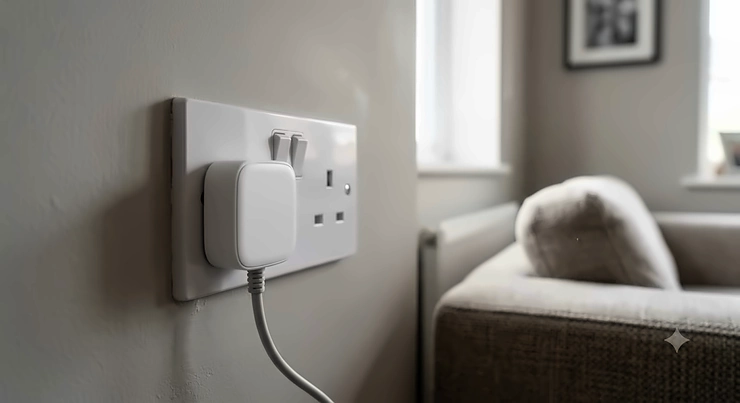
Here’s a very British kind of annoyance: you buy a smart plug, plug it in with a flourish, and then discover it’s swallowed the entire double socket whole. The neighbouring outlet is now hostage to a plastic brick the size of a fist. If you’ve ever stood in your kitchen holding a smart plug in one hand and a toaster in the other, wondering which one gets to live near the wall, you already understand why the search for a genuine mini smart plug for tight sockets matters more than it sounds.
This isn’t a niche complaint. UK homes are, on the whole, older and smaller than their American or even European counterparts, and our sockets reflect that — chunky BS 1363 three-pin designs squeezed two-to-a-plate above worktops, behind sofas, and beside washing machines with barely a centimetre to spare. A plug that’s “compact” by US standards can still be a clumsy oaf on a British wall.
Below, we’ve researched seven genuinely small smart plugs sold in the UK, comparing real specifications, aggregated review sentiment, and where each one actually shines — kitchens, hallways, behind furniture, on extension leads. Expect honest trade-offs alongside the recommendations: some of the smallest plugs skip features like energy monitoring, and one “budget” option here is anything but tiny. Where reviews couldn’t be verified for a specific claim, we’ve said so rather than inventing a testimonial. By the end, you’ll know exactly which mini smart plug for tight sockets suits your home, your ecosystem (Alexa, Google, Apple, or Matter), and your budget — and how to avoid the socket-blocking mistake so many buyers make. For broader context on why socket space matters in the first place, Electrical Safety First’s guidance on avoiding overloaded sockets is worth a skim before you buy anything.
What Is a Mini Smart Plug for Tight Sockets?
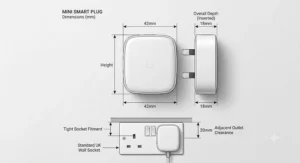
A mini smart plug for tight sockets is a Wi-Fi, Zigbee, or Thread-enabled plug adaptor built with a shortened or slimline body so it doesn’t overhang and block the second outlet on a UK double socket. Unlike standard smart plugs, which can be 6–8cm deep, these models are typically under 4–5cm from the wall face, prioritising physical clearance over bulkier features like large displays or built-in USB ports.
Quick Comparison Table
| Plug | Best For | Ecosystem | Price Range |
|---|---|---|---|
| TP-Link Tapo P100 | Tightest budget fit | Alexa, Google | under £15 |
| Meross Smart Plug Mini MSS110 | Thinnest overall body | HomeKit, Alexa, Google, SmartThings | £15-£20 |
| Amazon Smart Plug (2nd Gen) | Simplicity with Alexa | Alexa only | £15-£20 |
| TP-Link Kasa Mini KP105 | Multi-platform reliability | Alexa, Google, SmartThings, IFTTT | £12-£18 |
| Aqara Power Plug H2 UK | Matter/Thread futureproofing | Matter, Alexa, Google, Apple Home | low-to-mid £30s |
| Nedis SmartLife WiFi Plug | Rock-bottom budget | Alexa, Google | under £15 |
| Philips Hue Smart Plug | Existing Hue households | Bluetooth/Zigbee, Alexa, Google, Apple Home | £20-£40 range |
Looking at the spread above, three plugs stand out for pure physical tightness — the TP-Link Tapo P100, the Meross Smart Plug Mini MSS110, and the TP-Link Kasa Mini KP105 — while the Nedis SmartLife WiFi Plug is the cheapest on this list but noticeably bulkier, so it’s a compromise pick rather than a genuine tight-socket specialist. If Matter compatibility and long-term ecosystem flexibility matter more to you than shaving off the last few millimetres, the Aqara Power Plug H2 UK earns its higher price by being newer technology, not just a smaller box.
✨ Don’t Miss These Exclusive Deals!
🔌 Take your tight-socket problem seriously with a plug that actually fits. Click through to check current pricing and availability on any of the picks above — your neighbouring socket will thank you.
Top 7 Mini Smart Plugs for Tight Sockets: Expert Analysis
1. TP-Link Tapo P100 — smallest footprint on a genuine budget
The TP-Link Tapo P100 opens this list because it’s the plug most UK reviewers reach for first when a socket genuinely won’t accommodate anything bulkier. Its case is built specifically to avoid overhanging the second outlet on a standard double socket, and TP-Link markets this directly rather than as an afterthought.
On specs, the Tapo P100 handles a 13A maximum load (2990W), runs on 2.4GHz Wi-Fi only, and skips energy monitoring entirely — TP-Link reserves that for the pricier P110 and P110M in the same range. What that means practically: you get reliable on/off, scheduling, and Away Mode, but no live wattage readout. Based on the spec comparison with its siblings, this is clearly the “does one job well, cheaply” model in the Tapo line-up.
Reviewers consistently note the setup is fast and the physical footprint is genuinely one of the smallest in its category, though a few mention the Wi-Fi-only (no Bluetooth fallback) setup can be fiddly on 5GHz-only routers, since the plug simply won’t see a 5GHz network. This is a spec sheet detail buyers frequently miss until they’re standing in front of their router settings at 11pm.
Who should buy it: renters or anyone furnishing a first flat who wants the cheapest possible route into “smart plug that won’t block my other socket,” without caring about energy tracking or Apple HomeKit.
Pros:
- ✅ Genuinely tiny footprint, purpose-built to clear adjacent sockets
- ✅ Straightforward Tapo app with scheduling and Away Mode
- ✅ Among the cheapest true mini options on amazon.co.uk
Cons:
- ❌ No energy monitoring at all
- ❌ 2.4GHz Wi-Fi only, no HomeKit support
Price range: under £15 for a single unit, with multi-packs bringing the per-plug cost down further. For the money, the Tapo P100 is hard to argue with if space is your only real problem.
2. Meross Smart Plug Mini MSS110 — thinnest body for stacking two plugs per socket
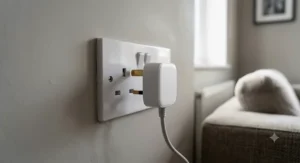
If the Tapo P100 is small, the Meross Smart Plug Mini MSS110 is arguably thinner still — Meross itself claims it’s the thinnest mini plug on the market, and independent testing broadly backs that up: TechRadar measured the UK unit at roughly 5.1 x 6.1 x 3.3cm, noticeably slimmer than many rivals. What most buyers overlook about this model is that its design goal isn’t just “leave the second socket free” — it’s specifically built so two Meross Mini plugs can sit side by side in the same double socket, doubling up your smart control in one outlet.
The physical on/off button sits neatly on the side rather than the front, and a pinhead LED indicates status without becoming a nightlight in a dark hallway. On the downside, TechRadar’s review found no energy monitoring and no Away Mode on this model — features some rivals include even at a similar price. It also runs on 2.4GHz only.
Aggregated customer sentiment on amazon.co.uk repeatedly praises the compact build and ease of pairing with Apple HomeKit, Alexa, and Google Assistant without a separate hub — a genuine advantage for households running mixed ecosystems, since most rivals on this list pick one primary platform and treat the rest as an afterthought.
Who should buy it: Apple HomeKit households, and anyone wanting to run two smart plugs from one double socket without an extension lead in sight.
Pros:
- ✅ Works natively with HomeKit, Alexa, Google, and SmartThings
- ✅ Slimmest body of the plugs tested here, ideal for stacking two
- ✅ No hub required for any supported ecosystem
Cons:
- ❌ No energy monitoring or Away Mode
- ❌ 2.4GHz Wi-Fi only, so no Thread/Matter support
Price range: around £15-£20 for a single unit, with 2- and 4-packs offering better value if you’re kitting out several rooms.
3. Amazon Smart Plug (2nd Gen) — the simplest setup for Alexa households
The Amazon Smart Plug takes a different approach to compactness. According to T3’s measurements, the UK version comes in at 63 x 96.2 x 56mm — not the smallest plug here, but not the biggest either, and T3 specifically flagged that if you want to use it in a truly tight space, it’s worth checking your plugged-in device still clears the neighbouring socket.
Here’s what the spec sheet won’t tell you outright: this plug is Alexa-exclusive by design. There’s no Google Assistant or HomeKit bridge, no third-party app required, and setup happens entirely inside the Alexa app — arguably the fastest onboarding of any plug on this list if you already own an Echo device, since it can even link automatically at checkout on some Amazon orders.
Reviewers on amazon.co.uk consistently rate the reliability highly, with several noting it reconnects automatically after a power cut or Wi-Fi dropout without needing to be re-paired — a real pain point on cheaper unbranded plugs. The trade-off is flexibility: if you ever switch to Google Home or Apple Home, this plug becomes dead weight.
Who should buy it: households fully committed to Alexa who want a “set it and forget it” plug with minimal fuss, and don’t mind a slightly larger body than the true minis on this list.
Pros:
- ✅ Fastest setup of any plug tested, especially with existing Echo devices
- ✅ Reliable reconnection after power or Wi-Fi outages
- ✅ Compact enough to leave the second socket usable in most cases
Cons:
- ❌ Alexa-only, no Google Assistant or HomeKit support
- ❌ Not the smallest body on this list, so worth double-checking clearance first
Price range: around £15-£20, occasionally bundled with Echo devices at a discount.
4. TP-Link Kasa Mini KP105 — best all-round compatibility in a small shell
The TP-Link Kasa Mini KP105 sits in an interesting middle ground: reviewers who’ve used both this and the Meross MSS110 side by side note the Kasa is around a centimetre taller, but still comfortably clears a second socket, and it adds IFTTT support alongside Alexa, Google Assistant, and Samsung SmartThings — a wider net than Meross casts.
What that centimetre buys you, based on the spec comparison, is a slightly sturdier-feeling plastic shell and a marginally more polished Kasa app, which several reviewers prefer for how routines are organised — each device shows its own routines rather than one long scrollable list. The trade-off is exactly what you’d expect: the Kasa Mini is very slightly less “invisible” in a socket than the true smallest options here.
Reviewers consistently describe the build quality as excellent for the price, and one detailed comparison review specifically called out how Kasa’s away mode randomises on/off timing convincingly enough to simulate occupancy, whereas some rivals use a fixed, predictable pattern.
Who should buy it: buyers who want broad ecosystem compatibility (including IFTTT automations) without sacrificing much size, and who value a mature, well-reviewed app over the absolute smallest possible plug.
Pros:
- ✅ Works with Alexa, Google Assistant, SmartThings, and IFTTT
- ✅ Away Mode uses randomised timing rather than a fixed pattern
- ✅ Compact enough to leave a second socket usable
Cons:
- ❌ Marginally larger than the smallest plugs on this list
- ❌ No native energy monitoring on this specific model (the KP115 variant adds it)
Price range: around £12-£18 for a single unit, competitive with the Tapo range.
5. Aqara Power Plug H2 UK — the newest tech for a tight socket
Launched in the UK in 2026, the Aqara Power Plug H2 UK is the newest product on this list, and it shows in the spec sheet: dual-protocol support for both Matter over Thread and Zigbee, energy monitoring, and a genuinely compact case designed, in Aqara’s own words, to leave neighbouring sockets on a power strip or wall outlet accessible.
Based on the spec comparison with the rest of this list, the standout feature is flexibility for the future rather than raw physical size. Matter over Thread means the plug can join any compatible smart home controller directly, while switching to Zigbee mode unlocks Aqara’s more advanced automation options if you already run an Aqara hub. The plug is rated for 13A and 3250W, comfortably enough for kettles and heaters — an important distinction from several mini plugs on this list, which cap out lower.
One detail worth flagging honestly: at the time of research, coverage from outlets like Matter Alpha and HomeKitNews noted the UK model’s Amazon availability had been delayed relative to the EU version, with direct purchase via Aqara’s UK web store filling the gap. Always check current availability and stock before assuming next-day delivery.
Who should buy it: buyers building a Matter or Thread smart home who want a mini plug that won’t need replacing when they upgrade their ecosystem in a year or two, and who value energy monitoring.
Pros:
- ✅ Dual-protocol Matter over Thread and Zigbee support
- ✅ Built-in energy monitoring and overload protection
- ✅ 13A/3250W rating comfortably covers higher-draw kitchen appliances
Cons:
- ❌ Premium price relative to basic Wi-Fi-only rivals
- ❌ UK-market Amazon stock has been inconsistent since launch
Price range: in the low-to-mid £30s — reflecting genuinely newer silicon and dual-protocol hardware, not just branding.
6. Nedis SmartLife WiFi Smart Plug — cheapest option, but not the tightest fit
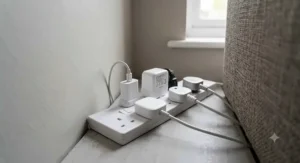
Every honest comparison needs at least one plug that doesn’t quite deliver on the “tight socket” brief, and that’s the Nedis SmartLife WiFi Smart Plug. At roughly 107 x 127 x 63mm for the standard indoor model, it’s meaningfully bulkier than every other plug on this list — closer to a traditional smart plug than a true mini.
What the spec sheet doesn’t immediately convey is why it’s still worth including: it’s consistently one of the cheapest genuinely branded smart plugs sold on amazon.co.uk, it includes built-in energy metering on several variants, and an IP44-rated outdoor version exists for anyone who also needs a weatherproof plug for garden lighting — a use case none of the true minis on this list cover.
Reviewers, including some non-English-language feedback aggregated on the product page, describe setup as simple and the app reliable, though nobody is claiming this plug disappears into a socket. If your priority genuinely is millimetre-tight clearance, this isn’t the pick; if your priority is “cheap, branded, and I’ll deal with the size,” it’s a reasonable budget fallback.
Who should buy it: budget-conscious buyers with slightly more generous socket space, or anyone who also wants a weatherproof outdoor-rated option from the same ecosystem.
Pros:
- ✅ Among the cheapest branded smart plugs available on amazon.co.uk
- ✅ Energy monitoring included on several variants
- ✅ Outdoor IP44-rated version available in the same range
Cons:
- ❌ Noticeably bulkier than every other plug on this list
- ❌ Will likely block a neighbouring socket in genuinely tight spots
Price range: under £15, often the least expensive branded option available.
7. Philips Hue Smart Plug — best for existing Hue households
The Philips Hue Smart Plug closes this list as the premium, ecosystem-specific pick. Currys and Philips both describe it as small and unobtrusive, designed so “your guests won’t even notice it’s there,” and hands-on reviewers confirm the UK version is compact and well-built, using both Bluetooth and Zigbee.
Here’s the honest analytical take: out of the box, using only Bluetooth, this plug works standalone with the Hue app for basic on/off control — no bridge required. But its real value only appears once paired with a Philips Hue Bridge (sold separately), which unlocks scheduling, Away from Home control, and integration with existing Hue lighting scenes. Buyers who already own a Bridge get a genuinely premium, tightly integrated experience; buyers starting from scratch are effectively paying for a second purchase to access the plug’s full feature set.
Reviewers frequently note the appeal for controlling non-smart lamps as part of a wider Hue lighting scheme — turning a standard lamp into something schedulable alongside genuine Hue bulbs — rather than as a general-purpose appliance plug.
Who should buy it: existing Philips Hue households who want one more device that fits invisibly into an established lighting ecosystem, rather than shoppers looking for a first, standalone smart plug.
Pros:
- ✅ Compact, unobtrusive design that blends into a socket
- ✅ Deep integration with existing Hue lighting scenes and routines
- ✅ Works with Alexa, Google Assistant, and Apple Home via Bridge
Cons:
- ❌ Full feature set requires a separately sold Hue Bridge
- ❌ Pricier than most plugs here for what is, at its core, an on/off switch
Price range: £20-£40 range depending on retailer and whether it’s bundled with other Hue accessories.
Top 7 at a Glance: Specs and Ratings
| Plug | Max Load | Energy Monitoring | Best For | Price Range |
|---|---|---|---|---|
| TP-Link Tapo P100 | 13A / 2990W | No | Tightest budget fit | under £15 |
| Meross Smart Plug Mini MSS110 | 13A | No | Stacking two per socket | £15-£20 |
| Amazon Smart Plug (2nd Gen) | 13A | No | Alexa simplicity | £15-£20 |
| TP-Link Kasa Mini KP105 | 13A | No (KP115 adds it) | Multi-platform reliability | £12-£18 |
| Aqara Power Plug H2 UK | 13A / 3250W | Yes | Matter/Thread futureproofing | low-to-mid £30s |
| Nedis SmartLife WiFi Plug | 13A | Yes (select variants) | Rock-bottom budget | under £15 |
| Philips Hue Smart Plug | 13A | No | Existing Hue households | £20-£40 range |
This table makes the trade-off pattern obvious: energy monitoring correlates almost exactly with price and physical size on this list, with the Aqara Power Plug H2 UK the only genuinely compact plug that manages both metering and a tight footprint. If you don’t need to track wattage, the Meross Smart Plug Mini MSS110 and TP-Link Tapo P100 remain the two tightest physical fits, and both cost meaningfully less than plugs that add monitoring hardware.
Setting Up a Mini Smart Plug in a Tight Socket: A Practical Guide
Buying the right plug solves half the problem; installing it badly creates a new one. Start by testing fit before committing to a socket location — plug the smart plug in alone first, then plug your appliance into it, since some plugs that clear an empty socket still crowd a socket once a bulky appliance plug (like a kettle or vacuum charger) is attached. Reviewers across the products above repeatedly mention this exact scenario tripping people up.
During the first 30 days, the most common mistake is pairing the plug to a 5GHz-only Wi-Fi network, since every plug on this list runs 2.4GHz exclusively — if your router broadcasts a combined SSID, this usually isn’t an issue, but dual-band routers with separate network names can cause silent pairing failures. Check your router settings before assuming the plug is faulty.
For maintenance, dust build-up around the pin contacts is the main long-term issue in kitchens specifically, where grease and steam accumulate faster than in a living room. A dry cloth wipe every few months, done with the plug switched off at the wall, keeps contacts clean without risking moisture ingress. Finally, label each plug inside its companion app with the actual appliance name rather than a generic “Plug 1” — this sounds trivial, but becomes genuinely important once you own four or five plugs and are building voice routines or schedules that need to target the right device instantly.
Real-World Scenarios: Who Actually Needs a Tight-Socket Smart Plug
Consider three household types where this specific problem — a smart plug blocking a neighbouring socket — actually bites.
A renter in a one-bedroom flat, working from a small desk wedged beside the only double socket in the room, needs both a desk lamp and a laptop charger live simultaneously. Here, the TP-Link Tapo P100 or Meross Smart Plug Mini MSS110 solves the problem outright, since either leaves genuine room for the second plug without an extension lead cluttering the desk.
A family running a busy kitchen with a kettle, toaster, and coffee machine competing for two sockets above a limited stretch of worktop needs something that survives higher wattage appliances cycling nearby and, ideally, tracks energy use across a full week of family cooking. The Aqara Power Plug H2 UK is the strongest match here, given its higher wattage rating and built-in monitoring, even though it costs more upfront.
A student moving into shared halls with one power strip serving a laptop, phone charger, desk lamp, and mini-fridge needs the cheapest possible way to add smart scheduling without eating into already-scarce socket space on that strip. The TP-Link Kasa Mini KP105 or Nedis SmartLife WiFi Smart Plug (if the strip has slightly more generous spacing) both fit a tight student budget, with the Kasa edging ahead on ecosystem compatibility for a shared house running mixed Android and iPhone devices.
Problem → Solution: Common Tight-Socket Headaches
Buyers repeatedly run into the same handful of problems, so here’s a direct fix for each.
Problem: the plug fits, but the appliance’s own plug now overhangs. Solution: check the appliance’s plug depth, not just the smart plug’s, before buying — bulky moulded plugs on items like phone chargers or laptop bricks are often the real culprit, and swapping to a slimline third-party charger cable can solve it without buying a new smart plug at all.
Problem: two smart plugs in one double socket keep interfering with each other’s Wi-Fi signal. Solution: this is rarely true interference and almost always a router range issue — reviewers of the Meross Smart Plug Mini MSS110 specifically designed for stacking report no signal conflict, so if you’re seeing dropouts, check your router’s position relative to the socket first.
Problem: the plug works fine until a nearby kettle or heater is switched on, then it disconnects. Solution: this points to voltage fluctuation from a high-draw appliance sharing the same circuit — plugs rated only to 13A can behave unpredictably here, so a higher-rated option like the Aqara Power Plug H2 UK at 3250W is the more robust choice for kitchen circuits specifically.
Problem: the smart plug’s status LED is too bright for a bedroom at night. Solution: several apps, including Aqara’s, let you disable or dim the status light entirely in settings — check this before assuming you’re stuck with it.
Problem: switching to a new voice assistant makes an old plug useless. Solution: prioritise Matter-certified hardware like the Aqara Power Plug H2 UK from the outset if you suspect you might change ecosystems, since Matter plugs aren’t locked to a single voice assistant the way the Amazon Smart Plug is to Alexa.
How to Choose a Mini Smart Plug for Tight Sockets
Picking the right model comes down to seven practical checks, in rough order of importance.
- Measure your actual socket clearance first. Don’t guess — a tape measure against the depth of your existing double socket, including any appliance plug already in the neighbouring outlet, tells you more than any spec sheet.
- Confirm 2.4GHz Wi-Fi compatibility, or Matter/Thread support if relevant. Every plug reviewed here needs a 2.4GHz network unless it explicitly supports Thread, so check your router settings in advance.
- Match the ecosystem to what you already own. Buying a HomeKit-compatible plug like the Meross Smart Plug Mini MSS110 is pointless if your household runs entirely on Alexa, and vice versa.
- Decide whether energy monitoring actually matters to you. It adds cost and, generally, a slightly larger case — worth it for kitchen appliances, less so for a hallway lamp.
- Check the amp rating against what you’ll plug in. A 13A rating covers most household devices, but always confirm before connecting anything with a motor, such as a small heater or fan.
- Read aggregated review sentiment for reconnection reliability. Plugs that silently drop off Wi-Fi after a power cut are a genuine long-term annoyance that spec sheets never mention.
- Factor in whether you need a companion hub. The Philips Hue Smart Plug only reaches its full potential with a Bridge — an extra cost some buyers don’t realise until after purchase.
Compact Plug Design: What Actually Makes a Plug Tight-Socket Friendly
Not every plug marketed as “compact” earns the label in practice, and this is genuinely worth unpacking rather than taking marketing copy at face value. A well-executed compact plug design isn’t just about overall size — it’s about where the bulk sits relative to the socket face. A plug that’s short front-to-back but wide side-to-side can still block a neighbouring outlet just as effectively as a taller one, because UK double sockets sit outlets side by side rather than stacked.
The genuinely successful compact plug design examples on this list, the TP-Link Tapo P100 and Meross Smart Plug Mini MSS110, both shave depth specifically along the axis that matters: the width running parallel to the wall plate, not the projection outward from the wall. Based on the spec comparison, this is why the Meross model can be stacked two-to-a-socket while a bulkier plug like the Nedis SmartLife WiFi Smart Plug, despite being genuinely small in absolute terms compared to old-style plug-in timers, still crowds a double socket.
What most buyers overlook is that compact plug design almost always trades away something — usually a physical on/off button, a status display, or energy monitoring circuitry, all of which need internal space. Reviewers consistently note this trade-off is worth accepting for tight installs, but it’s worth going in with eyes open rather than assuming “smaller” is simply “better” across every metric.
Double Socket Clearance: Why Millimetres Matter
Double socket clearance is the single most practical measurement in this entire buying decision, and it’s the one spec sheets are worst at communicating clearly. Manufacturers list overall plug dimensions, but rarely specify how much of that depth actually overhangs the socket face versus sitting flush within the housing — the number that determines whether your second outlet stays usable.
Here’s what the spec sheet won’t tell you outright: a plug listed at, say, 5cm deep might still leave a full 5cm of clearance to the neighbouring socket, or it might leave almost none, depending on how the manufacturer measured it — from the wall plate or from the pin tips. TechRadar’s hands-on measurement of the Meross Smart Plug Mini MSS110 at 5.1 x 6.1 x 3.3cm is useful precisely because it’s an independent, verified figure rather than a marketing claim.
Practically, the fix is simple: before buying, look for independent reviews that state measured dimensions rather than relying purely on the retailer listing, and where possible, check whether the reviewer specifically mentions double socket clearance rather than just overall size. Buyers repeatedly report that plugs performing well on paper still crowd a double socket once a bulky appliance plug — like a laptop charger or hairdryer — is plugged in alongside, so factor in the widest item you’re likely to plug in next to it, not just the smart plug itself.
Mini Smart Plug for Tight Sockets vs Standard Smart Plugs
| Factor | Mini Smart Plug for Tight Sockets | Standard Smart Plug |
|---|---|---|
| Typical depth | Under 4-5cm from wall face | 6-8cm or more |
| Double socket clearance | Usually leaves second outlet free | Frequently blocks it |
| Feature set | Often skips energy monitoring, displays | Commonly includes monitoring, sometimes USB ports |
| Amp rating | Typically 13A | Often 13A-15A, occasionally higher |
| Best For | Tight double sockets, extension leads, kitchens | Single sockets, dedicated appliance circuits |
The analysis here is fairly clear-cut: standard smart plugs generally pack in more functionality — energy monitoring, built-in USB charging ports, sometimes a physical display — precisely because they don’t need to sacrifice internal space for a slimmer body. A mini smart plug for tight sockets makes the opposite trade, prioritising clearance over features. Households with generous single sockets or dedicated appliance points genuinely don’t need to compromise, so standard plugs like the TP-Link Tapo P110 or P110M remain sensible choices there. The moment you’re dealing with double sockets in a kitchen, hallway, or behind a sofa, though, the calculus shifts firmly toward the compact category covered in this guide.
Small Kitchen Sockets: Choosing and Using Mini Smart Plugs Safely
Kitchens deserve their own section because small kitchen sockets combine every challenge on this list at once: limited worktop space, multiple appliances competing for the same double socket, and higher-wattage devices like kettles and toasters that draw more current than a bedroom lamp ever will.
For small kitchen sockets specifically, prioritise amp rating over raw size. A plug rated at 3250W, like the Aqara Power Plug H2 UK, has meaningfully more headroom than the 2990W ceiling on the TP-Link Tapo P100 — a difference that matters if you’re routing a kettle or slow cooker through a smart plug rather than just a lamp or radio. Energy monitoring also earns its keep in a kitchen more than almost anywhere else in the house, since it’s the room where standby drain from appliances like coffee machines and microwaves tends to accumulate fastest.
Steam and grease are the other kitchen-specific factor worth flagging honestly: no plug reviewed here is rated for wet environments, so keep smart plugs well clear of hob splashback zones and always switch off at the wall, not just via the app, before any deep clean near a socket. If you regularly rely on extension leads because your small kitchen sockets simply aren’t enough, Electrical Safety First’s advice on extension lead safety is directly relevant — it specifically warns against daisy-chaining leads, a habit that’s easy to fall into in a socket-starved kitchen.
Who should prioritise this section: anyone plugging a smart plug into a socket shared with a kettle, toaster, microwave, or slow cooker, rather than low-draw electronics.
Common Mistakes When Buying a Mini Smart Plug for Tight Sockets
The single most common mistake, based on aggregated review patterns across every product above, is buying based on the word “mini” or “compact” in the product title alone, without checking an independently verified measurement. As covered earlier, manufacturer marketing and actual double socket clearance don’t always align.
A second frequent error is ignoring amp rating in favour of price. Several of the cheapest plugs on this list cap out at 13A, which is fine for lamps and electronics but genuinely risky for kettles, heaters, or anything with a motor — always check the appliance’s own rating plate before assuming a budget plug can handle it.
Third, buyers regularly purchase a plug tied to one ecosystem (Alexa-only, in the case of the Amazon Smart Plug) without considering whether they might switch voice assistants or add Apple devices to the household later. Given how affordable Matter-certified alternatives like the Aqara Power Plug H2 UK have become, locking into a single-ecosystem plug is an increasingly avoidable mistake.
Finally, several reviewers across multiple products in this list mention buying a single plug to “test it out,” only to discover the per-unit price in a multi-pack is significantly lower — worth checking pack pricing before committing to singles if you know you’ll want several.
Long-Term Cost & Maintenance
On pure purchase price, the TP-Link Tapo P100 and Nedis SmartLife WiFi Smart Plug are the cheapest entry points on this list, both sitting under £15 for a single unit. But total cost of ownership looks different once you factor in what each plug actually does over a year of use.
Plugs with energy monitoring — currently only the Aqara Power Plug H2 UK and select Nedis variants on this list — can meaningfully offset their higher upfront price by surfacing standby power waste. According to the Energy Saving Trust, the average UK household loses somewhere in the region of £45-£100 a year to appliances left on standby, and a monitoring-capable plug is one of the few ways to actually see which specific device is responsible, rather than guessing. For a kitchen appliance running daily, that visibility alone can pay back the price difference between a monitoring and non-monitoring plug within a year or two.
Maintenance costs, by contrast, are close to zero across every plug reviewed here — there are no consumable parts, and the main long-term risk is Wi-Fi firmware support ending on older models, which is more a software lifespan question than a hardware one. Buying from established brands with a track record of ongoing app updates — TP-Link, Meross, Aqara, and Philips all qualify here — reduces the risk of a plug becoming unsupported within a couple of years, a real concern with unbranded budget alternatives not covered in this list.
Safety, Regulations & Compliance Guide
Every plug reviewed in this guide falls under the UK’s Product Security and Telecommunications Infrastructure (PSTI) Act, which came into force in April 2024 and requires manufacturers of connectable consumer products — including smart plugs — to ban easily guessable default passwords and provide a clear route for reporting security vulnerabilities. In practice, this means every plug listed here should force you to set a unique password during setup rather than shipping with something like “admin/admin,” and reputable brands publish a PSTI compliance statement on request. You can read the full detail of what the law requires via the NCSC’s guidance on smart devices and the PSTI Act.
Beyond digital security, physical socket safety matters just as much in a tight-socket context. Squeezing a smart plug and a high-draw appliance into a double socket doesn’t inherently overload the circuit — that’s governed by your home’s wiring and fuse rating, not the plug itself — but it does increase the temptation to add an extension lead or block adaptor when space runs out, which is exactly the scenario Electrical Safety First warns against. Never daisy-chain extension leads, always check the current rating marked on any extension lead before use, and if you find yourself permanently reliant on adaptors in one room, it’s worth asking a registered electrician whether additional sockets can be installed.
Finally, always check the amp rating of any smart plug against the appliance you intend to run through it — every plug in this guide is rated to 13A, which comfortably covers lamps, chargers, and small electronics, but caution is warranted with anything drawing close to that ceiling continuously, such as space heaters.
FAQ
❓ What is the smallest smart plug for a tight UK socket?
❓ Do mini smart plugs work with Alexa and Google Home?
❓ Can I fit two smart plugs in one double socket?
❓ Are mini smart plugs safe for kitchen use with kettles?
❓ Do smart plugs need a hub to work?
Recommended for You
- Smart Plug With Energy Monitoring: 7 Best UK Picks 2026
- Best Outdoor Smart Plug UK 2026: 7 Weatherproof Picks That Won’t Let You Down
- Smart Plug vs Smart Extension Lead 2026: 7 Best Picks Compared
Disclaimer: This article contains affiliate links. As an Amazon Associate, I earn from qualifying purchases. If you purchase products through these links, we may earn a small commission at no additional cost to you.
✨ Found this helpful? Share it with your friends! 💬🤗
